
SMV Audio Editor (No Ads)

Images
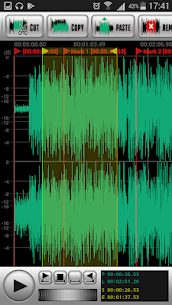


Description
SMV Audio Editor (No Ads) MOD APK – Professional Audio Editing on Android
Edit, mix, and enhance your sound with SMV Audio Editor, a powerful all-in-one audio editing tool designed for creators, musicians, and sound engineers. This app provides professional-grade audio processing features directly on your Android device, making it easy to record, edit, and export high-quality audio anywhere.
Complete Audio Editing Toolkit
SMV Audio Editor includes a full range of editing tools that allow you to manipulate audio with precision and flexibility.
Core editing features include:
- Cut, copy, paste, and trim audio
- Merge multiple audio files
- Split audio using timeline markers
- Direct editing without re-encoding (MP3, AAC, OGG, Opus)
- File-level editing for fast processing
Audio Mixing & Advanced Processing
The app supports advanced sound manipulation tools for creative audio production and professional editing.
You can:
- Mix multiple audio tracks
- Adjust volume and balance
- Downmix multichannel audio to stereo or mono
- Convert mono to stereo
- Reconfigure audio channels
- Enhance stereo sound quality
Powerful Audio Effects & Filters
SMV Audio Editor includes a wide range of built-in audio effects to improve and transform your sound.
Effects include:
- Graphic and parametric equalizers
- Reverb and echo effects
- Flanger and phaser
- Pitch shifting
- Low-pass and high-pass filters
- Noise reduction and DC offset correction
Audio Recording & Export Options
The app allows high-quality audio recording with flexible output formats and settings.
Supported formats include:
- MP3, FLAC, WAV, OGG, Opus
- AAC and other common audio codecs
You can also:
- Auto-split recordings into multiple files
- Export in different audio formats
- Adjust sample rate and bit depth settings
Built-In File Manager & Tag Editor
SMV Audio Editor comes with a simple file manager to organize your audio projects and a tag editor to modify metadata like artist name, album, and track details.
Wide Format Compatibility
The app supports a broad range of audio formats and technical specifications, making it suitable for both casual users and professionals.
SMV Audio Editor MOD APK Features
Ad-Free Audio Editing
Enjoy uninterrupted workflow without ads or distractions.
Full Feature Unlock
Access all editing tools, effects, and export options without restrictions.
Professional Audio Control
Unlock advanced processing tools for high-quality sound editing and mixing.
Why Users Choose SMV Audio Editor
SMV Audio Editor is popular because it combines simplicity with professional-level audio editing capabilities. It is suitable for music production, podcast editing, and general audio processing on mobile devices.
It is ideal for:
- Musicians and audio creators
- Podcast editors
- Sound designers
- Students and beginners learning audio editing
What's new
Fixed: errors while mp3 encoding with 320 kbps constant bitrate.